


Our own software product
SSR Garage is becoming the digital workspace for modern garages.
In development
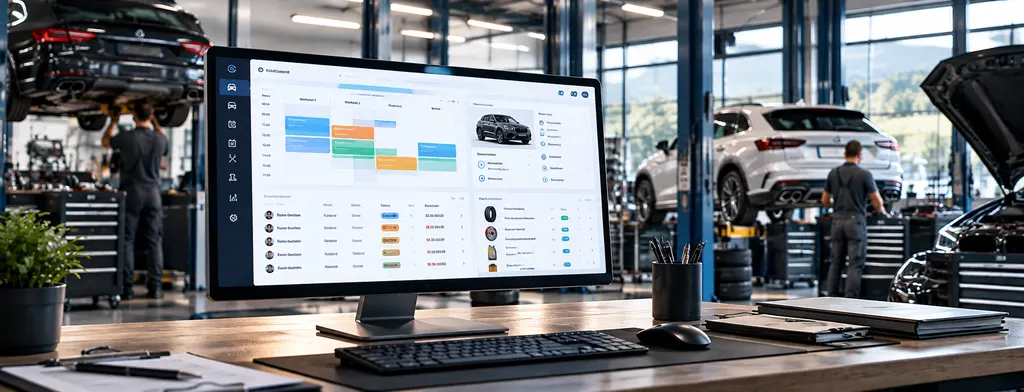
With SSR Garage we are developing our own software for garages and workshops. Customers, vehicles, work orders, parts and appointments are meant to come together in one place. The product is not yet publicly available.
Starting point
From scattered workshop routines to a connected system
These topics are at the centre of the concept. For each problem we describe the planned approach.
Often todayCustomer data, vehicle history and work orders sit in different programs or on paper.
Planned approachCustomer, vehicle and work order are linked and available in one place.
Often todayThe same details are entered several times for work order, quote and invoice.
Planned approachDetails are entered once and reused from the quote through to the invoice.
Often todayAppointments, lifts and employees are hard to plan together.
Planned approachAppointments are planned per lift, and the status is visible to everyone.
Often todayKey figures about the business are not available at a glance.
Planned approachDashboard and reports show utilisation and completed work orders.
The system
Modules that work together
SSR Garage is designed as one connected system. A work order knows the customer and the vehicle, uses parts from stock and finally becomes an invoice.
- Enter onceInformation is available in every module.
- Visible statusEveryone involved sees where a work order stands.
- End to endFrom the quote and the work order to the invoice.
Planned modules
How the user interface is meant to work
Select a module to see its concept view. Scope and order may still change during development.
Planned
Dashboard
The day at a glance with appointments, current work orders and stock alerts.
- Today's work orders and status
- Today's appointments per lift
- Alerts for low stock
Planned
Customers
Private and business customers with contact details, vehicles and work order history.
- Contact details in one place
- All vehicles of a customer
- Previous work orders
Planned
Vehicles
Vehicle data and service history linked directly to the owner.
- Plate, type and year
- Mileage
- Work order history per vehicle
Planned
Work orders
Record labour and parts as line items and keep the status traceable.
- Line items for labour and parts
- Status from scheduled to completed
- Hand-over to the invoice
Planned
Appointments
Plan appointments by lift and time so that capacity stays visible.
- Daily plan per lift
- Status right in the appointment
- Linked to the work order
Planned
Parts & stock
Keep stock and minimum levels in view and use parts directly in the work order.
- Stock and minimum level
- Alerts when stock runs low
- Parts in the work order
Planned
Purchase orders
Record orders with suppliers and track them until the goods arrive.
- Draft, ordered, received
- Supplier and quantity
- Linked to stock
Planned
Quotes
Create structured quotes and turn them into a work order once accepted.
- Quote per vehicle
- Status open or accepted
- Conversion into a work order
Planned
Invoices
The invoice is created from the completed work order with all line items.
- Line items from the work order
- VAT calculation
- Overview of all invoices
Planned
Documents
Service reports, checklists and copies filed with the right work order or vehicle.
- Filed per work order and vehicle
- Easy to find again
- Consistent structure
Planned
Sales
Record vehicles for sale and manage their status in the same system.
- Sales vehicles with key data
- Price and status
- Reservations
Planned
Employees
Employees, roles and attendance as the basis for planning.
- Roles in the business
- Attendance and working hours
- Basis for roles and permissions
Planned
Reports
Key figures and overviews that help run the business.
- Completed work orders per week
- Lift utilisation
- Further key figures planned
Also planned
- Roles and permissions
- Time tracking
- Interfaces to other systems
- Import of existing data
Example workflow
From the customer to the invoice
This is how a work order could move through SSR Garage. All details come from the demo and are fictional.
- CustomerAnna MusterMusterortThe customer is found or added.Open this step in the demo
- VehicleZG 000 001Estate · 2019The vehicle is linked to the customer.Open this step in the demo
- Appointment06/10/2026 · 08:00Lift 1Appointment with lift and time.Open this step in the demo
- Work orderWA-0001ServiceThe work order is created from the appointment.Open this step in the demo
- Line items4 line itemsCHF 337.00Labour and parts are recorded.Open this step in the demo
- StatusIn progress→ Ready for pick-upProgress is visible to everyone.Open this step in the demo
- InvoiceRE-0001CHF 364.30 incl. VATInvoice and documentation for the work order.Open this step in the demo
Possible use
One interface for the whole business
The concept is for everyone in the business to work with the same data and see the view they need for their task.
- Front desk and officeRecord customers and vehicles, plan appointments, create quotes and invoices.
- WorkshopSee work orders and line items, update the status, use parts.
- ManagementKeep track of utilisation, open quotes and completed work orders.
DemoIn development
Try the concept yourself
The clickable demo shows dashboard, customers, vehicles, work orders, appointments, stock, quotes, invoices and reports. It runs without a backend and with fictional data.
View clickable demoProduct status
Interested in becoming a pilot garage?
Would you like to get to know SSR Garage early and contribute experience from your workshop? Register your interest without obligation. Whether and when a pilot is possible is something we will discuss personally once development allows it.